
Key Points
In a staff record, each Tab can hold several Forms, and each Form can have many records attached to it.
Depending on the Form, you may be able to add new records, edit existing records, print, and create a PDF of a record and email it.
What you see depends on your level of access and your system's restrictions. If you can't see something you think you need, ask your FlowLogic admin or supervisor.
Each template Tab has a specific purpose. You can keep the provided structure or customise it to suit your business.
Your view may look different depending on the level of access you have and the restrictions of your system. If there is something that you believe you need access to and cannot see, advise your flowlogic admin or supervisor.
How Tabs, Forms and records fit together
Each tab may have multiple corresponding forms within it. Then each form can have many records attached to them.
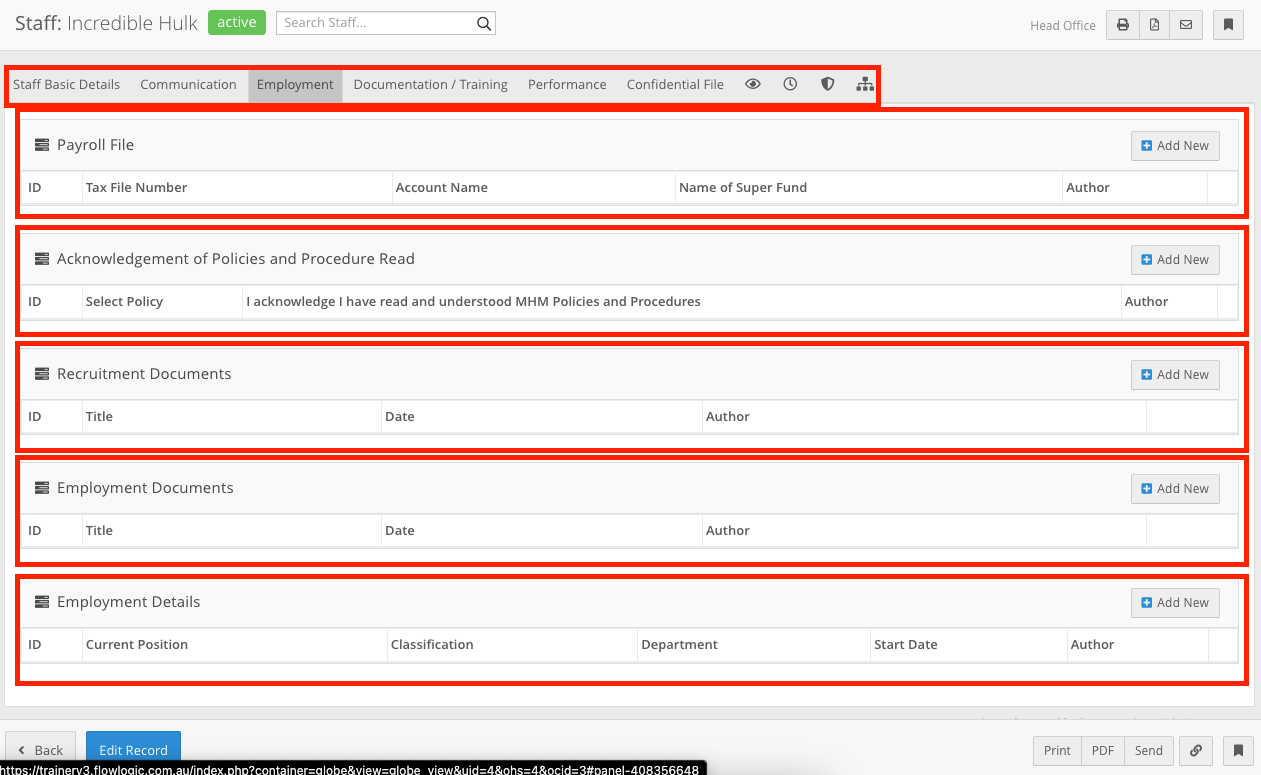
As you can see in the above image, for some forms you can add new records but others you may not be able to. Here you can also edit existing records and print. From here you may also be able to create a PDF of the record and email it.
Template tabs and their purpose
When beginning with Flowlogic your template will look similar to the above images. Each Tab will hold a specific purpose, you can continue to utilise the provided structure or begin customising it to suit your business better. We have a dedicated chapter on how to edit sections and forms for more information on how to do this.