
Key Points
If your 2FA code isn't accepted, check your phone's date and time are set automatically. Authenticator app codes are based on the time, so even a small difference stops them working.
If the codes still don't match, turn off any VPN and make sure your authenticator app has only one FlowLogic entry for your account.
If you've lost or replaced your phone, or nothing else works, ask your FlowLogic admin team to reset your 2FA. Admins locked out of their own 2FA should contact FlowLogic Support.
If you're asked for a code every time even though you ticked the option to remember the device, your browser may be blocking cookies.
My authenticator app codes don't match
Authenticator app codes are based on the time, so your phone's date and time must be set automatically. If they're even slightly out, FlowLogic won't accept the code.
On an Android phone:
- Open your phone's Settings and search for Date & time.
- Turn on the automatic date and time and automatic time zone options.
On an iPhone:
- Open the Settings app.
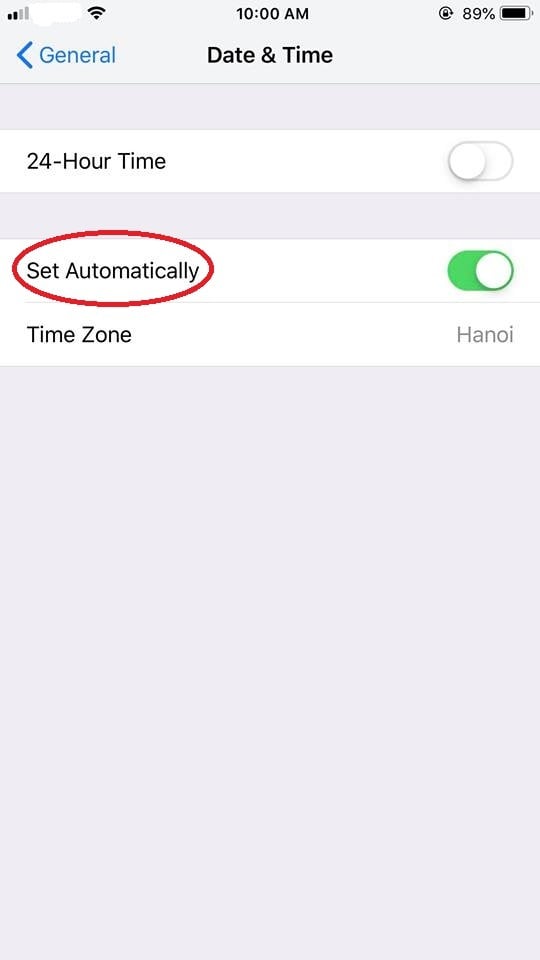
- Select General, then Date & Time.
- Turn on Set Automatically. If it's already on, turn it off, wait a few seconds and turn it back on.
If the codes still don't match:
- Turn off any VPN on your phone or computer.
- Check your authenticator app only has one FlowLogic entry for your account. Delete any old ones.
- If it still doesn't work, ask your FlowLogic admin team to reset your 2FA so you can set it up again.
I lost or replaced my phone - how can I reset the authentication?
Ask your FlowLogic admin team to reset your 2FA. They can follow the steps in How do I reset a user's 2FA?
If you're a FlowLogic admin and you're locked out of your own 2FA, contact FlowLogic Support at support@flowlogic.com.au.
I ticked the option to remember this device, but I get asked for a code every time
If you've selected the option to remember the device, but FlowLogic still asks for a 2FA code every time you log in, your browser may be blocking cookies.
Cookies are small text files stored on your device to remember what you've done. If they're blocked, FlowLogic can't remember that you've already passed 2FA on that device.
To turn cookies on, or check they're on, see How do I enable cookies in my browser for FlowLogic?